Move actions forward
Your actions move forward, and it shows
Every decision becomes an action with a named owner, held to a date. You track progress, arbitrate priorities, and clean up the plan when it drifts.
See the detail
Ornexia connects the decision to its execution.
Book a demoExecuting your actions on one side, running your meetings on the other.
Every decision becomes an action with a named owner, held to a date. You track progress, arbitrate priorities, and clean up the plan when it drifts.
See the detailThe pack is ready before the meeting. The method is set. The minutes become an action plan with no re-typing.
See the detailOrnexia covers the blind spot in your tools. Where your tools plan and list tasks, Ornexia tackles the forgotten link: the efficiency of your steering. Project governance accounts for 15 to 35% of your teams' capacity.
And all of this, from day one. Ornexia is ready for every profile — from the project manager to the occasional contributor, all the way to your clients. Self-service rollout: you open the tool, you create your first committee, and you steer.
Ornexia
The decisions made in meetings, the actions they trigger, the risks behind them. From committee preparation to closing the action.
Your spreadsheets — Excel, Google Sheets
One file per committee, one version per person. Who has the right one? Every update costs time, and the whole thing is fragile.
Your work management tools — Jira, Monday, Asana
They handle the backlog and the sprints. A steering-committee action is not a ticket. And only your technical teams use them: for a sponsor or a client, they're too heavy.
Your planning tools — MS Project, Planisware
They hold the milestones and the workload. Tracking decisions is a different job. Updates stay in the hands of PMOs and project managers.
Key:Natively, no effort requiredPossible, but takes work or disciplineThe tool's model doesn't allow it
"What exactly was I asked to do — across all those meetings whose minutes I never have time to read?"
Get a 360° view of everything expected of me
Know my exact role on each request (R/A/C/I)
Update my progress in 30 seconds
"How much time do I spend preparing, reporting and chasing — instead of steering?"
Build the deck for the next committee
Formalize the minutes and action plan without pulling an all-nighter
Keep track of what was decided from one session to the next
Manage risks
See the state of an entire program
"What exactly is expected of me — without having to dig through everything else?"
See only the items that concern me, no noise
Know what's expected of me (approval, deliverable, feedback)
Contribute without training or full tool access
"Does the tool adapt to how we work — or do we contort ourselves to fit it?"
Your bodies, your stages, your statuses
Your library of standard business risks
Your checklists and launch templates
Your roles and permissions to match your organization
"What exactly was I asked to do — across all those meetings whose minutes I never have time to read?"
| Ornexia | Spreadsheets * | Work management tools * | Planning tools * | |
|---|---|---|---|---|
| Get a 360° view of everything expected of me | Everything assigned to me, across all committees, finally formalized in one place | Nothing is formalized: no minutes, or scattered minutes I have no time to read | Only what someone took the time to create as a ticket | Resource view, not "what's being asked of me" |
| Know my exact role on each request (R/A/C/I) | R / A / C / I explicit, at the action level | — | Assignee + followers: the nuance doesn't exist | — |
| Update my progress in 30 seconds | Simplified view, ready without training | Right file, right version, no edit conflict | You have to learn the tool first | Reserved for the planner |
"How much time do I spend preparing, reporting and chasing — instead of steering?"
| Ornexia | Spreadsheets * | Work management tools * | Planning tools * | |
|---|---|---|---|---|
| Build the deck for the next committee | Regenerated for each session from the real state (PPTX + DOCX + XLSX), zero re-entry | The Sunday-night ritual: copy-paste from 4 sources | You rebuild the deck pulling from the tool + your notes | Raw export to reformat by hand |
| Formalize the minutes and action plan without pulling an all-nighter | AI assists you: you formalize and communicate far faster what you no longer had time for | Re-entry in a tab, disconnected from tracking | Everything is retyped by hand into the tool | — |
| Keep track of what was decided from one session to the next | Each decided item becomes an action tied to its committee: you track the action, you don't lose the thread | One tab per minutes file, no continuity | The action becomes a ticket cut off from the meeting that produced it | — |
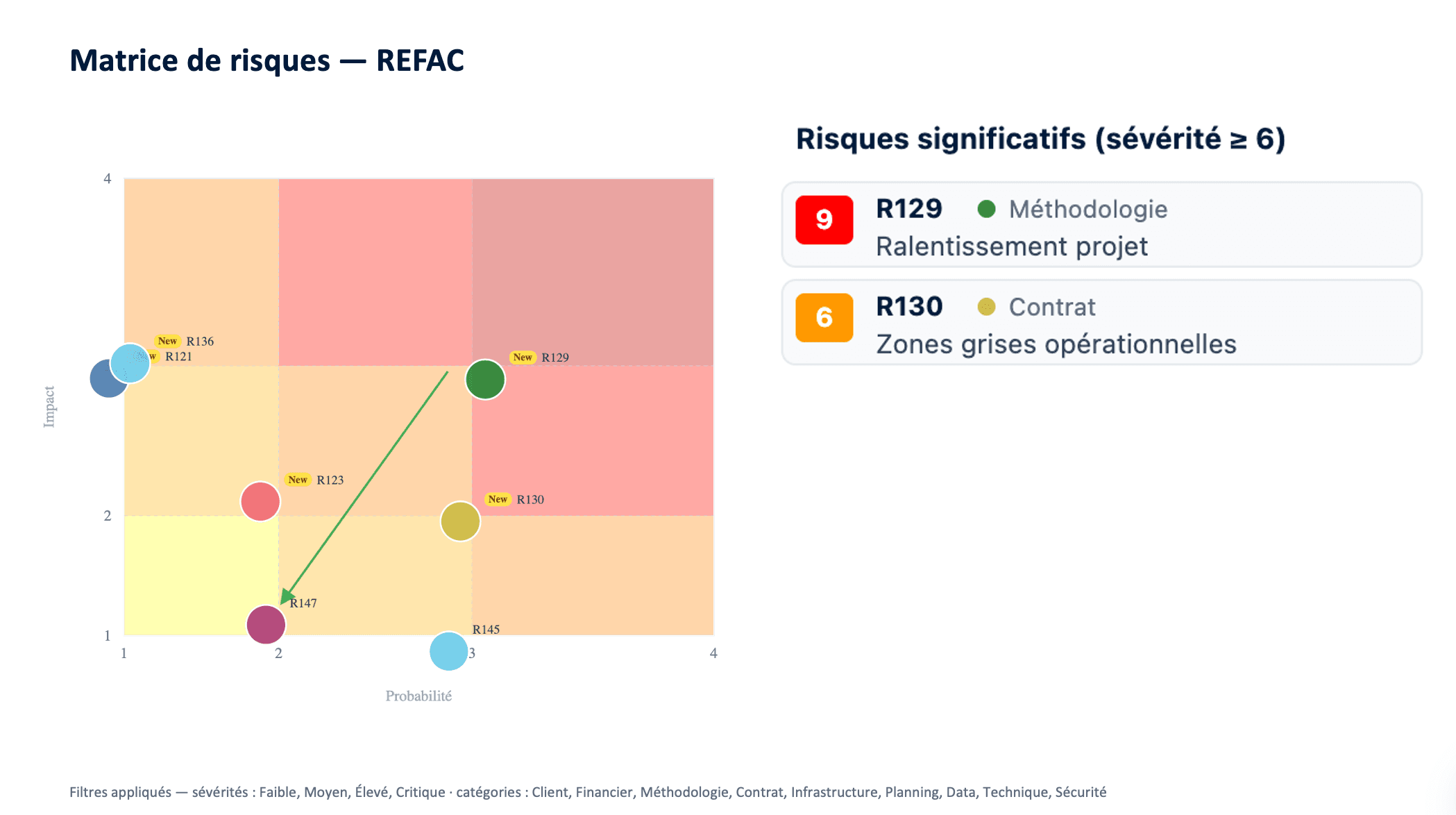
| Manage risks | Register prob × impact, dated reviews, linked to mitigation actions | Static table you have to remember to reopen | Paid plugin or absent | Isolated module, never linked to actions |
| See the state of an entire program | Native aggregation of risks + actions + RACI | Manual consolidation, fragile | Premium plans only | A genuine strength of these tools |
"What exactly is expected of me — without having to dig through everything else?"
Your client has no cockpit: they only see the items that concern them. That's precisely the value — a clear, noise-free window onto their share, where other tools either lose them or flood them.
| Ornexia | Spreadsheets * | Work management tools * | Planning tools * | |
|---|---|---|---|---|
| See only the items that concern me, no noise | Scope filtered to what's assigned to me | I get sent the whole file | Guest access = dropped into the whole project | — |
| Know what's expected of me (approval, deliverable, feedback) | My actions and my R/A/C/I role, explicitly | In an email or minutes I haven't read | Buried in tickets designed for the technical team | — |
| Contribute without training or full tool access | Lightweight view, immediate to grasp | Shared file, uncertain version | You have to learn the tool to find your way | Specialist tool |
"Does the tool adapt to how we work — or do we contort ourselves to fit it?"
| Ornexia | Spreadsheets * | Work management tools * | Planning tools * | |
|---|---|---|---|---|
| Your bodies, your stages, your statuses | Committee types, project stages, action statuses, generic roles — all configurable | Anything is possible… and everything has to be rebuilt by hand | Custom fields, but the committee doesn't exist as an object | Cycle locked by the tool |
| Your library of standard business risks | Reusable catalog, cloned for each new project | Copy-paste between files → drift guaranteed | — | — |
| Your checklists and launch templates | Templates + wizard mapping generic roles → real people | Frozen template file, quickly out of sync | Generic templates, unrelated to your governance | — |
| Your roles and permissions to match your organization | Groups and fine-grained permissions, modeled on your structure | "Who can write where" rests on trust | Standard roles, hard to adapt | Roles imposed by the tool |
These tool families excel where Ornexia doesn't go: backlogs, sprints, Gantt, integrations, large-program planning. This grid compares one field only: committee governance and execution tracking.
Ornexia produces your governance documents in the formats your teams already use.
PowerPoint
Committee minutes ready to present
Word
Detailed, structured minutes
Excel
Structured data for your analyses
No. Those tools handle the backlog and the planning. Ornexia handles the actions decided in meetings and how committees run. The two work side by side.
Ornexia is ready to use from the first login, including for occasional contributors and for your clients.
Your committee types, project stages, action statuses, roles and permissions are all configured in the tool.
Learn more →The application and database run on Microsoft Azure, France Central region. AI analysis uses a model hosted in the European Union. Only this marketing website is served from the United States, and it holds no project data.
Learn more →Each organisation has its own space within the database: its own tables, reference data and users. The separation is structural, not a filter applied to shared tables.
Learn more →It helps you draft the minutes, extracts the actions, analyses the action library, and answers questions about how the product works. Extracted actions arrive marked "to validate": nothing joins the action plan without your approval. The feature stays switched off until your organisation turns it on.
Learn more →Every save freezes a complete version of the action, with its author and timestamp. A separate log records sensitive operations, and the author's initials stay readable even after their account is deleted.
Learn more →Import picks up the actions your teams are already tracking in their files. On the way out, actions, risks and reference data export in full and can be re-imported. The configuration you build belongs to you.
Learn more →Point-in-time restore over the last thirty-five days, plus a daily backup on a rolling cycle. Two automated checks replay a full restore every week to verify it works.
Learn more →A 30-minute demo, focused on your context. No commitment.
Book a demo